What the Similarity Report actually shows
The Similarity Report compares your submission with sources Turnitin can access: webpages, publications, and student papers already stored in repositories. The percentage is the share of your text that matched something in those sources — Turnitin’s student overview of the Similarity Report documents the same mechanics.
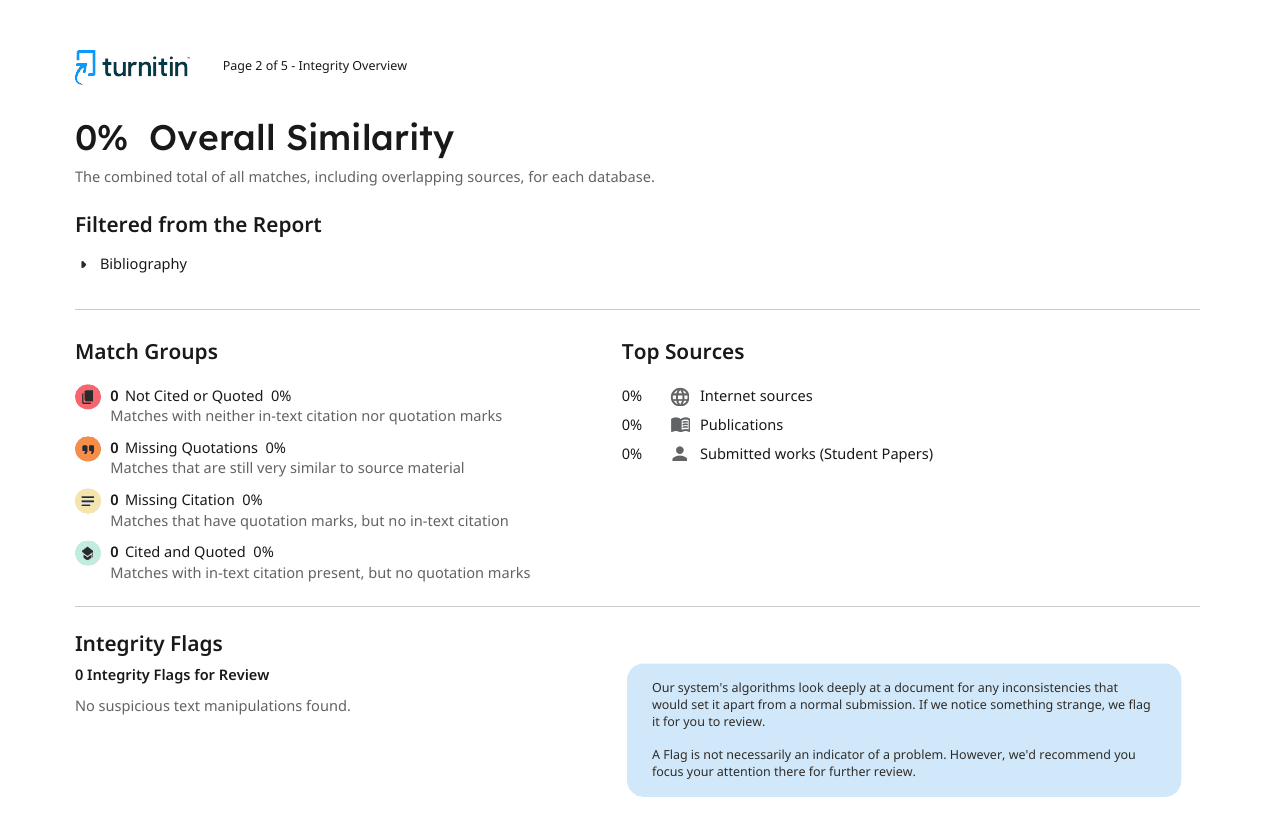
That percentage is useful, but it is only a starting point. A 12% report can hide one uncited copied paragraph. A 35% report can be mostly quotations, references, and assignment template text. The report needs a human reading.
If the number itself is what you are worried about, start with what counts as a good Turnitin score and what the report colors mean.
Step 1: Open the largest matches first
Do not try to fix the number blindly. Open the source list and inspect the biggest matches first. A few large matches usually matter more than dozens of tiny common phrases.
- If a full paragraph matches, rewrite or quote and cite it.
- If the match is your bibliography, it may be harmless.
- If the source is your own earlier submission, check repository risk.
- If the match is a template, ask whether the instructor excludes it.
For self-match situations, read whether Turnitin keeps a record of checked work.
Step 2: Separate quoted, cited, and uncited text
The most important question is not "what percentage did I get?" It is "what kind of match is this?" Sort each highlighted passage into one of these buckets:
- Quoted and cited: usually acceptable if the quote is necessary and not too long.
- Cited but too close: needs paraphrasing in your own structure, not just swapped words.
- Unquoted copied text: fix before submitting.
- Reference list matches: often expected, especially in research papers.
Step 3: Use color codes carefully
Turnitin color codes help you scan the report, but they are not grades. Turnitin’s own guidance on the similarity score says the same: green is not automatic approval, and yellow or orange is not automatic misconduct. The same percentage can mean different things in a lab report, legal memo, literature review, or short reflection paper.
If you want the percentage ranges, use the Turnitin similarity score guide. Use this page for the practical reading workflow.
Step 4: Decide what to revise
Good revision lowers real overlap instead of trying to hide it. Focus on the passages where your own argument disappears behind the source.
- Rewrite source-heavy paragraphs around your claim first.
- Use short direct quotes only when the exact wording matters.
- Add citations where an idea or evidence comes from a source.
- Keep your reference list clean with a consistent citation style.
For reference formatting, the free citation generator can help you build APA, MLA, Chicago, or Harvard entries.
What the Similarity Report does not tell you
Similarity is separate from AI detection. You can have 0% similarity and a high AI score if the text is original but machine-written. You can also have high similarity and a low AI score if a human copied source text.
If your assignment uses both checks, read the reports together. Start with similarity for source overlap, then read the AI report for writing pattern risk. For the AI side, see what your Turnitin AI score means.
Can you see the report before your instructor?
Sometimes your instructor enables student report access or a draft assignment. Some schools provide Turnitin Draft Coach. Many do not. If you cannot see the report through school, the only close preview is a real Turnitin check before the final submission.
If you have never seen the interface, start with this real, redacted Turnitin report example to compare the Similarity Report with the separate AI Writing Report.
If you use any pre-check, make sure it is no-repository. A storing check can create a self-match when you submit the final version. For the safe workflow, read how to check your Turnitin score before submitting.
Frequently asked questions
What is a Turnitin Similarity Report?
A Turnitin Similarity Report shows what percentage of your submission matches sources in Turnitin databases, websites, journals, and student-paper repositories. It highlights matched text and lists the sources.
Does a high Turnitin similarity percentage mean plagiarism?
No. The report shows matching text, not a plagiarism verdict. Quotes, references, templates, and correctly cited passages can all raise the percentage.
What should I check first in the Similarity Report?
Open the largest matches first, then check whether the matched text is quoted, cited, paraphrased in your own structure, or accidentally copied.
Should I exclude quotes and bibliography in Turnitin?
Only if your instructor allows it. Excluding quotes and bibliography can make the percentage more useful, but the raw report still matters for academic review.
Is the Similarity Report the same as the AI report?
No. Similarity measures overlap with sources. The AI report estimates AI-written or AI-paraphrased text. The two scores are separate.