How the Turnitin similarity score works
Short answer: the similarity score is the percentage of your text that matches sources in Turnitin’s database, shown with a color band from blue (0%) to red (75–100%). It is not a plagiarism verdict: quotes, your reference list, and common phrasing all count as matches, and it is a completely separate number from the AI-writing score. Whether your own number is a problem depends on your course; for that call, see what counts as a good Turnitin score.
What the similarity score actually measures
Your similarity score is the percentage of your text that matches sources in Turnitin’s database. Turnitin calculates it by dividing the words in your submission by the words that match outside sources (web pages, journals, and other students’ papers). That’s all the number is: a measure of overlap. Turnitin’s older interface called it the similarity index; the current report calls it the overall similarity. Same number, two names.
Two things it is not. First, it’s not a plagiarism ruling. Turnitin says straight out that the report shows matching text and doesn’t decide whether anything is plagiarism. Quotes, your reference list, and common phrasing all count as matches even when you did everything right. Second, it’s not your AI score. The similarity number and the AI-writing number are independent and can point in opposite directions, so a clean similarity score tells you nothing about your AI score. (For that one, see what your Turnitin AI score means.)
If you already have the report open and need a source-by-source workflow, use how to read a Turnitin Similarity Report.
Turnitin similarity score color codes and percentages
In a standard Similarity Report the score comes with a color code. If you are searching for Turnitin color codes, this is the usual meaning of blue, green, yellow, orange, and red:
| Color | Range | What it means |
|---|---|---|
| Blue | 0% | No matching text found. |
| Green | 1–24% | Low. One word up to roughly a quarter matched. Usually fine for a cited essay. |
| Yellow | 25–49% | Moderate. Worth opening the report to see what’s matching. |
| Orange | 50–74% | High. A large share matches sources; check it carefully. |
| Red | 75–100% | Very high. Most of the text matches something; almost always needs a rewrite or a closer look. |
These are Turnitin’s standard report colors. Some LMS integrations use different bands, so treat the colors as a guide, not a hard rule, and go by the actual percentage and your instructor’s policy.
For a colour-by-colour breakdown — including why a blue 0% is not automatically good news — see what green, blue, and yellow mean on Turnitin. If you just want to know whether your own number is a problem, see what counts as a good Turnitin score.
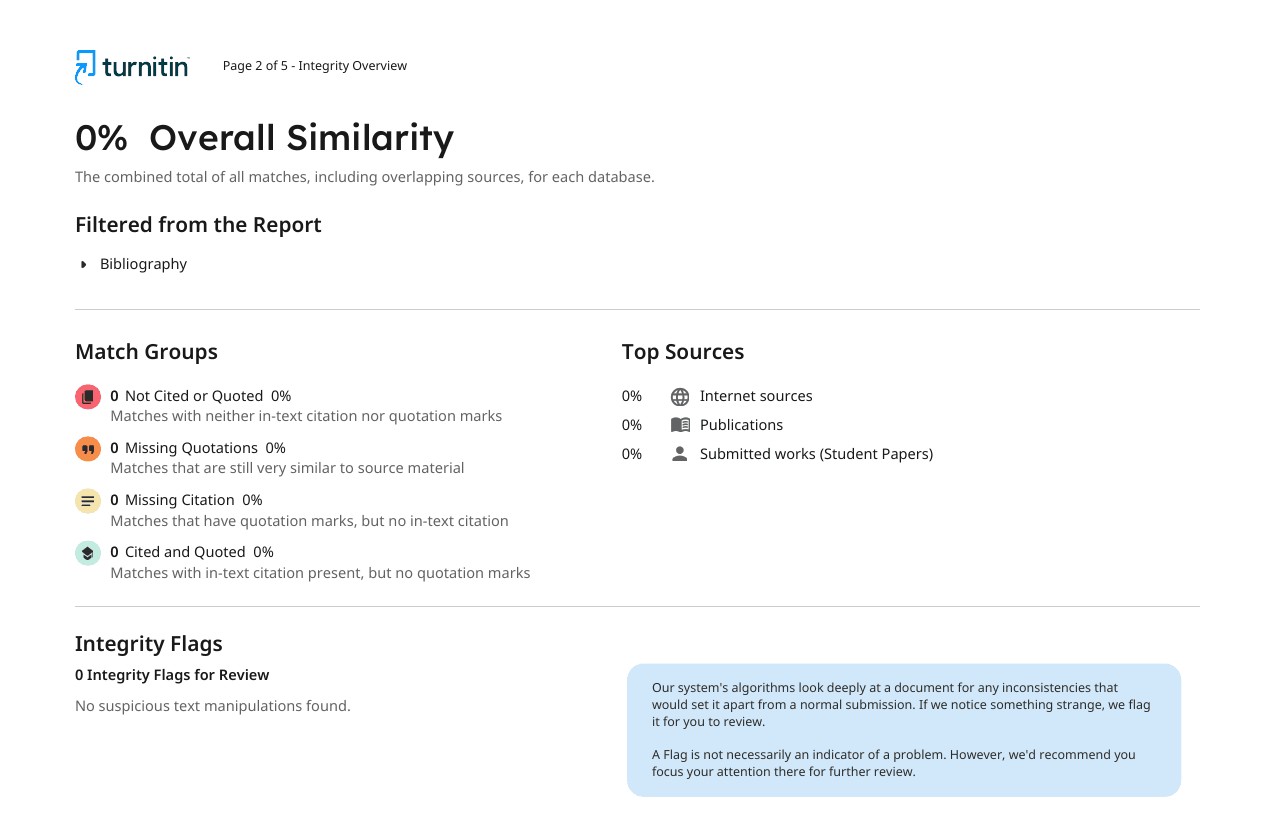
A green Turnitin score usually means low similarity, not automatic approval. You still need to check whether the matched text is quoted, cited, or accidentally copied. For the broader report mechanics, read how Turnitin works.
So is 20% bad? Is 40%? What counts as “good”?
Short version here; the full number-by-number reading, including 7%, 16%, 31%, and 36%, lives in what is a good Turnitin score. There’s no official pass mark, and Turnitin says so directly: every school, instructor, and assignment can set its own acceptable amount. With that caveat, here’s the practical rule of thumb most people use:
- Under 15%: almost always fine.
- 15–25%: usually acceptable, especially with lots of quotes and citations.
- 25–40%: worth opening the report to see what’s matching.
- Above 40%: review carefully; a big share matches sources.
Treat those as informal, not gospel. Your syllabus or assignment brief beats any rule of thumb. And remember the report itself matters more than the headline number: 10% that’s all uncited copying is a real problem, while 35% that’s all quotes and references usually isn’t.
So if you are asking whether 36 similarity on Turnitin is bad, the answer is: not automatically, but it is definitely inspect-worthy. At 36%, you need to know what is matching. A bibliography-heavy research paper may be fine; a short essay with uncited paragraph matches is not.
What 51 real Turnitin similarity reports actually scored
Rules of thumb are easier to trust with real numbers beside them. Between May and September 2026, 51 student papers checked through SubmitSense came back with a scored Similarity Report, averaging roughly 6,300 words each. This is where the percentages landed:
| Similarity range | Papers | Share |
|---|---|---|
| 0–10% | 31 papers | 61% |
| 11–25% | 16 papers | 31% |
| 26–50% | 1 paper | 2% |
| Above 50% | 3 papers | 6% |
The median was 5%. Half of the papers scored 5% or less, and three quarters scored 17% or less. If your number is under 25%, you are with nine out of ten papers we have seen.
The three papers above 50% scored 88%, 98%, and 100%. Numbers that high are the signature of a paper that already exists in Turnitin’s database, most often an earlier submission of the same work, rather than of someone who copied most of an essay from the web. If you land there and know you did not copy, the first thing to check is whether a draft was submitted somewhere before; see does Turnitin save your paper. One caveat on the sample: these are papers students chose to check before a deadline, so it leans toward people who were already worried, not a random slice of coursework.
Why a 0% score can be a red flag
It feels like 0% should be the dream result. Often it isn’t. A real research paper quotes and cites sources, so those should show up as small matches. A flat 0% can mean your references weren’t detected, the file didn’t process correctly, or you haven’t actually cited anything. A small, well-cited percentage usually looks more credible than a suspicious zero.
Why your score can be high even if you didn’t plagiarize
High overlap and cheating are not the same thing. Scores climb for completely legitimate reasons:
- Direct quotes you’ve quoted and cited properly
- Your bibliography or reference list matching other reference lists
- Common phrases, technical terms, and standard methodology wording
- A previous draft of your own paper already in the database
If your number looks high, open the report before you panic. To bring it down the honest way: paraphrase instead of copying, keep quotes short, cite as you go, and (if your instructor allows) exclude the bibliography and quoted text from the report. A free citation generator can format those references for you.
Can you check your similarity score before you submit?
This is the catch. Turnitin won’t let you self-check a paper for similarity unless an instructor has set up a draft assignment, or your school has paid for Turnitin Draft Coach. A lot of schools haven’t, which leaves most students with no free way to see their number before the deadline.
The one reliable way to see your real similarity report in advance is to run your paper through the actual Turnitin yourself. That’s exactly what our Turnitin AI checker does: you get the official similarity report (and the AI-writing report) your instructor would see, processed privately and deleted within 24 hours.
Frequently asked questions
Is a 1% similarity score bad?
No. 1% means almost nothing in your paper matched Turnitin’s database, which is normal for a short, mostly original piece. The only time a very low number deserves a second look is when you know you quoted and cited sources and expected those to show up as small matches. If they did not, check that the file processed correctly rather than worrying about the score.
Is the similarity index the same as the similarity score?
Yes. Turnitin’s older interface labelled the headline number the Similarity Index; the current Similarity Report calls it the overall similarity, and instructors and students mix the two names freely. Both refer to the same percentage of matched text, so a guide written about one applies to the other.
Is a 13% similarity score okay?
13% is in the low/green range and is usually fine for a normal essay with quotes and references. Most instructors wouldn’t blink at it. As always, the only number that truly counts is the limit your course or institution sets.
Is 20–25% similarity on Turnitin too high?
Not on its own. A 20–25% score is common for well-cited work and is acceptable in plenty of courses, but it’s the zone where some instructors start looking closer. Open your report: if the matches are quotes and properly cited sources, you’re usually fine.
Is a 40% (or higher) similarity score bad?
It’s worth taking seriously. At 40%+ a large chunk of your text matches existing sources, so you’ll want to open the report and check it’s not unquoted or uncited material. It still isn’t automatic proof of plagiarism (a long quoted block or bibliography can push it up), but it’s the range that invites scrutiny.
Is 36 similarity on Turnitin bad?
36% similarity is not automatically bad, but it is high enough that you should open the report and inspect every match. If most of it is quotes, references, or properly cited source material, it may be acceptable. If it is uncited prose, rewrite and cite before submitting.
What is an acceptable Turnitin similarity percentage?
There’s no official cutoff. Turnitin says plainly that every school, instructor, or assignment can set its own acceptable amount. As a rough rule of thumb, under 15% is almost always fine, 15–25% is usually acceptable, 25–40% is worth investigating, and above 40% needs a careful look. Always check your syllabus over any rule of thumb.
Why is a 0% similarity score sometimes a red flag?
A genuine research paper usually quotes and cites sources, so a flat 0% can look odd, since it can mean references weren’t picked up, the file didn’t process properly, or sources aren’t cited at all. 0% isn’t automatically “best.” A small, well-cited percentage often looks more credible.
How do I lower my Turnitin similarity score?
Legitimately: paraphrase in your own words instead of copying, keep direct quotes short and properly quoted, cite as you go, and rework over-quoted sections. If your instructor allows it, excluding the bibliography and quoted material from the report also drops the number. Don’t try to trick the matcher; fix the actual overlap.
Does a high similarity score mean I plagiarized?
No. Turnitin is clear that the Similarity Report shows matching text, not plagiarism, and it doesn’t make a judgment. Quotes, your reference list, common phrases, and correctly cited material all count as matches. A human reviews the report to decide whether any of it is a problem.
Is the similarity score the same as the AI writing score?
No. They’re two separate, independent numbers. Similarity measures how much of your text matches existing sources; the AI score estimates how much reads as AI-generated. Turnitin says the two “do not influence each other,” so you can have low similarity and a high AI score, or the reverse. For that side, see what your Turnitin AI score means.
Can I check my Turnitin similarity score before I submit?
Usually not for free. Turnitin won’t let students self-check a paper unless an instructor sets up a draft assignment, or your institution has licensed Turnitin Draft Coach (many haven’t). The only reliable way to see your real similarity report in advance is to run your paper through the actual Turnitin via a service like this one.
Why is my Turnitin similarity score still loading?
A first report often finishes in a few minutes, but Turnitin says uploaded files can take 10–15 minutes and resubmissions can take up to 24 hours. Large PDFs, image-heavy files, and LMS delays can also keep the score loading. For more detail, see how long Turnitin takes.
See your real Turnitin similarity report
Students can’t usually self-check similarity before submitting. Run your paper through the real Turnitin to see the official similarity and AI-writing reports your instructor sees, processed privately and deleted within 24 hours.
Run a real Turnitin checkNot affiliated with, endorsed by, or sponsored by Turnitin, LLC. “Turnitin” is a trademark of Turnitin, LLC, used here descriptively.